TL;DR
- Build a Python price tracker for Amazon using Scrapingdog’s Amazon Scraper (free 1,000 credits).
- Fetch current price with
requests, parse JSON, and compare to your threshold. - Send alert emails via
smtplibwhen the price drops. - Run hourly with a simple
time.sleeploop; full code included.
Wanna Buy some items on Amazon?
But afraid that the current pricing of the product doesn’t match your budget?
Well, you can wait for the price to drop. But when will it drop?
In this tutorial, we are going to build an Amazon Price Tracker using our old favorite programming language ‘Python’.
We will first scrape prices from any Amazon product and then will set an alert when the price drops a certain number.
Requirements
I hope you have already installed Python 3.x on your machine. If not, you can download it from here. After this, we will create a folder to keep this project. I am naming the folder scraping.
					mkdir scraping
cd scraping
Now, we will install all the libraries that we need in this tutorial.
requests– This will be used to make a GET request to the API which provides Amazon pricing.smtplib– This will be used to email when the price drops.time– To create a delay between two consecutive function calls. We will talk about this later.
We just need to install requests as the other two libraries are pre-installed.
pip install requests
We also have to sign up for a free Amazon Scraping API which will help us extract the pricing of any product in real time. The trial package comes with a generous 1000 free credits. So, it is enough for testing.
Scraping Amazon Product Pricing
We will be scraping the price of this product page. In this section, we are going to scrape Amazon prices using the API.
					import requests
import time
import smtplib
from email.mime.text import MIMEText

def check_price():
    api_url = 'http://api.staging.scrapingdog.com/amazon/product?api_key=YOUR-API-KEY&domain=com&asin=B0BSHF7WHW'

    try:
        response = requests.get(api_url)

        price = int(float(response.json()['price'].replace("$","").replace(',', '')))

        print(f"Current price: {price}")

        if int(price) < 2147:
            print(price)
    except requests.RequestException as e:
        print(f"Error fetching price: {e}")

check_price()
- Imports:
requests– A Python library used for making HTTP requests.time– A Python library providing various time-related functions (though it’s not used in this function).smtplibandemail.mime.text.MIMEText-Libraries for sending emails, but these are not used in the provided function.
2. The check_price Function
api_url– This is a URL string that points to an API endpoint. It appears to be for an Amazon product’s price, fetched using the Scrapingdog API service.- The function makes an HTTP GET request to the API using
requests.get(api_url). - It then parses the JSON response to extract the product’s price.
response.json()[‘price’]gets the price from the JSON response..replace(“$”,””).replace(‘,’, ”)removes the dollar sign and commas from the price string. This is necessary to convert the price from a formatted string (like$2,147.42) to a number.int(float(…))first converts the cleaned string to a float (to handle decimal points) and then to an integer. This effectively truncates any decimal part.- Our budget is anything below $2147. So, we have set a condition that if the price is less than 2147 we will send ourselves an email. We will write the email function in the next section.
- The
try-exceptblock catches exceptions related to the network request (like connectivity issues, or errors returned by the API).
3. Calling check_price
- Finally, the function
check_price()is called to execute the code.
Remember you have to use your API key in the above code.
Once you run the code you will get this.

Setting Price Alert Email
In this section, we will write an email function that will help us send an email if the price of the product is under our budget.
					def send_email(price):
    sender_email = "your-email@gmail.com"
    receiver_email = "receiver-email@example.com"
    password = "your-password"

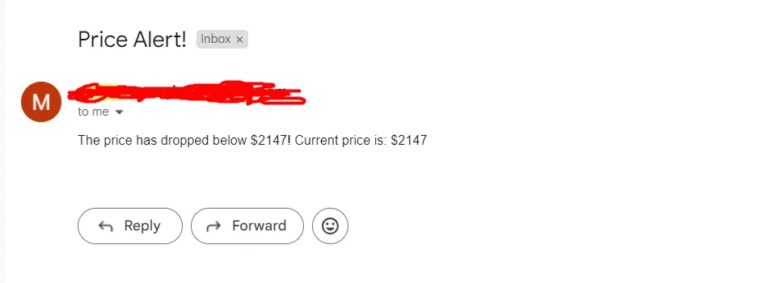
    message = MIMEText(f"The price has dropped below $2147! Current price is: ${price}")
    message['Subject'] = "Price Alert!"
    message['From'] = sender_email
    message['To'] = receiver_email

    try:
        with smtplib.SMTP('smtp.gmail.com', 587) as server:
            server.starttls()
            server.login(sender_email, password)
            server.sendmail(sender_email, receiver_email, message.as_string())
            print("Email sent successfully!")
    except Exception as e:
        print(f"Error sending email: {e}")
Let me explain the above code step by step.
def send_email(price)– This line defines a function namedsend_emailthat takes one argument,price.sender_email– The email address that will send the notification.receiver_email– The email address that will receive the notification.password– The password for the sender’s email account. For security reasons, hardcoding passwords like this is not recommended in a production environment.MIMEText– This is a class from theemail.mime.textmodule used to create an email body. The email body in this case includes a message about the price drop and the current price.- The
Subject,From, andToheaders of the email are set to appropriate values. - The function uses
smtplib.SMTPto connect to Gmail’s SMTP server atsmtp.gmail.comon port 587 (the standard port for SMTP with TLS). server.starttls()– This command starts TLS encryption for the connection, ensuring that the email contents and login credentials are securely transmitted.server.login(sender_emai password)– Logs into the SMTP server using the provided credentials.server.sendmail(sender_email, receiver_email, message.as_string())– Sends the email.- If the email is sent successfully, “Email sent successfully!” is printed. If there’s an error during this process, it’s caught in the
exceptblock and printed.
Setting a Time Interval
time library.
					while True:
    check_price()
    time.sleep(3600)
This code will run the check_price() function every hour. Our motive is to constantly monitor the pricing of the product and as soon as the price comes under our budget we will send an email to ourselves.
Complete Code
					import requests
import time
import smtplib
from email.mime.text import MIMEText

def send_email(price):
    sender_email = "your-email@gmail.com"
    receiver_email = "receiver-email@example.com"
    password = "your-password"

    message = MIMEText(f"The price has dropped below $2147! Current price is: ${price}")
    message['Subject'] = "Price Alert!"
    message['From'] = sender_email
    message['To'] = receiver_email

    try:
        with smtplib.SMTP('smtp.gmail.com', 587) as server:
            server.starttls()
            server.login(sender_email, password)
            server.sendmail(sender_email, receiver_email, message.as_string())
            print("Email sent successfully!")
    except Exception as e:
        print(f"Error sending email: {e}")

def check_price():
    api_url = 'http://api.staging.scrapingdog.com/amazon/product?api_key=YOUR-API-KEY&domain=com&asin=B0BSHF7WHW'

    try:
        response = requests.get(api_url)

        price = int(float(response.json()['price'].replace("$","").replace(',', '')))

        print(f"Current price: {price}")

        if int(price) < 2147:
            send_email(price)
    except requests.RequestException as e:
        print(f"Error fetching price: {e}")

while True:
    check_price()
    time.sleep(3600)
Test Email
For testing purposes, we can set the price budget above or equal to $2147 and see if the code works or not.
So, once you run the code you should see this on your console.
With this our Amazon Price Tracker is ready!!
Now, you can track any product’s pricing and email yourself.
You can integrate this into an app or website. Sign up for Amazon Scraping API, spin it with 1000 free credits, and see if it works for you!!
Key Takeaways:
The guide explains how to build an automated price tracker for Amazon products using code (typically Python).
It shows how to send requests to Amazon product pages and retrieve price and availability information programmatically.
You learn how to parse and extract key product fields such as current price, discount, currency, and stock status.
The tutorial outlines setting up the tracker to run periodically (e.g., daily) to monitor price changes over time.
Automating price tracking helps with competitor pricing intelligence, deal alerts, and market analysis.
Conclusion
In this blog, we understood how you can keep track of products on Amazon when they drop a certain level. Just like Amazon, you can use Python to track prices from other marketplaces as well, such as walmart & eBay.
If you are a beginner in Python, I would recommend you go through this comprehensive guide on web scraping with Python.
Also, Don’t hesitate to reach out to me on chat if you got stuck somewhere in this article!! I am a “Hi” away on chat!!
Happy Tracking!!